How do I download Amazon orders for envelopes?
Use the Unshipped Orders report in Seller Central. Amazon's help gives the steps: from the Orders menu, select Order Reports, select FBM Unshipped Orders at the top of the page, and click Request Report. Amazon says the report can take up to 45 minutes and can be requested once every four hours, and it includes the buyer's name, phone number and ship to address. Download it when it is ready and keep it as the .txt file Amazon gives you.
The Unshipped Orders report has no prices, so PigeonTrail can't tell which orders are worth more. If you want that, use the FBM Orders report on the same Order Reports page, which Amazon says you download from the bottom of the page and which carries each item's price. Amazon notes that Seller Central doesn't generate order reports beyond 30 days.
How do I bring Amazon orders into PigeonTrail?
Drop the file on the Orders page in PigeonTrail, as it came from Amazon. PigeonTrail recognizes the file by its column names, so you don't rename or delete anything first, and when an order has one row per item, the rows are folded back into one order. Each address is checked against USPS data before anything prints, and an address USPS can't match is flagged so you can fix it with the buyer. PigeonTrail mails only to addresses in the United States.
Amazon's reports are tab separated text files with one row per item, and PigeonTrail reads them that way, adding up the item prices for each order ID. When the file carries each order's value, orders of $50 or more go to a separate Packages list instead of your letters, with a file you upload to Pirate Ship to buy Ground Advantage labels. You can change that $50 line in Settings, or turn it off.
How do I print tracked envelopes?
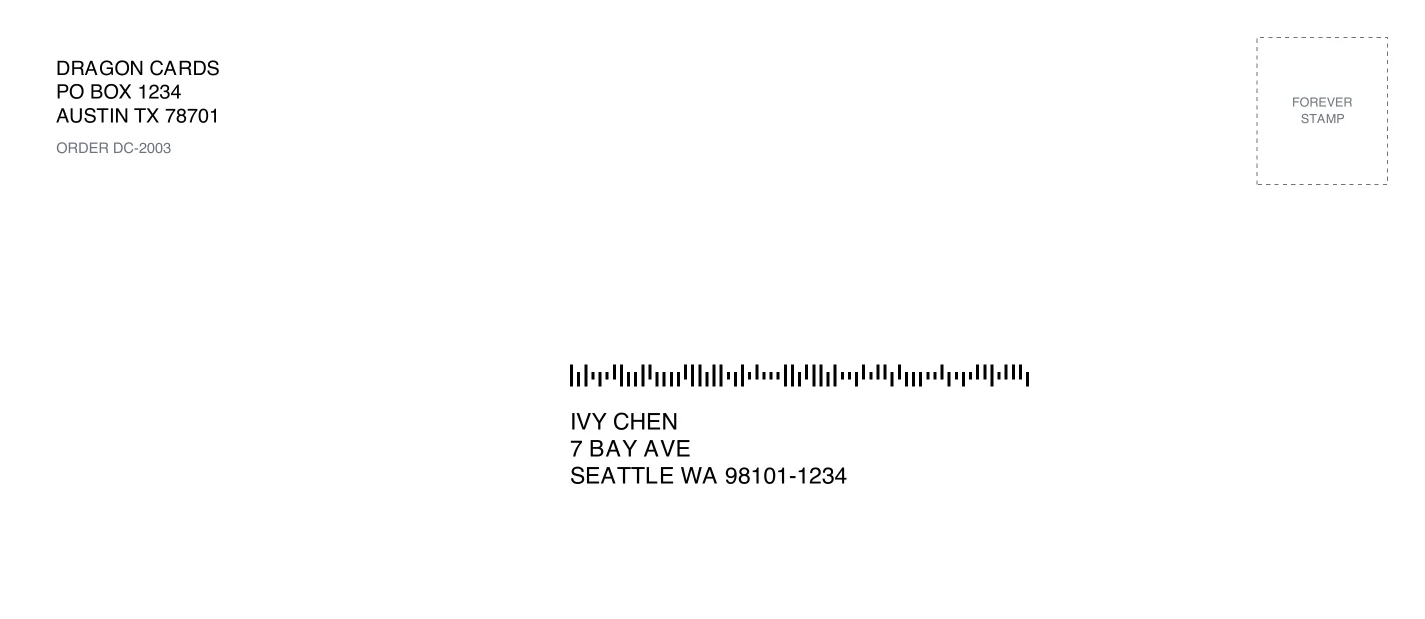
Pick the orders, choose what to print on and print from your own printer. PigeonTrail prints #10, #9, #6 3/4, A7 and 6 x 9 envelopes, Avery 5163 address sheets, 4 x 2 and 4 x 6 thermal labels, and a window slip that folds into a #10 window envelope. Each one carries the buyer's address and a USPS Intelligent Mail barcode in the places USPS's machines read them, with your return address and, if you like, your logo. You add a Forever stamp, which is $0.82 for a 1 ounce letter, and drop the letters in the mail.
The barcode only gets scanned when the letter goes through USPS's sorting machines, so keep it flat and flexible. Our letter checker tells you whether a mailer counts as a letter, whether it is machinable and how many stamps it needs.
What does my buyer see?
Every letter gets a tracking page with your shop's logo and colors, a map of the route so far and the day USPS expects it to arrive. Amazon gives sellers a relay address for each buyer instead of the real one, and its Buyer Seller Messaging help says mail to that address from anything but your registered address is rejected, so PigeonTrail never emails Amazon buyers. Amazon also doesn't allow proactive shipping confirmations, so share the tracking link when a buyer writes to ask where an order is, by replying in Buyer Seller Messaging. If you're on Pro, the emails come from your shop's name, and your buyer hears from you when the letter is mailed, when it's almost there and when USPS marks it delivered.
A letter's scans come from USPS's sorting plants, and its delivered event is USPS's estimate from the carrier's route rather than a scan at the mailbox. Our guide to what each USPS scan means explains what your buyer will see.
Does Amazon accept a letter barcode as valid tracking?
No. Amazon's Valid Tracking Rate policy asks every seller to keep at least 95% of tracked shipments valid in each product category, and it counts a tracking ID as valid only if it comes from an Amazon integrated carrier in Seller Central's carrier list and Amazon records at least one physical carrier scan. PigeonTrail's barcodes carry our own USPS Mailer ID, and USPS reports a barcode's scans only to the owner of that Mailer ID and the companies it chooses to share them with. Amazon has no way to read a PigeonTrail barcode's scans, so never type our number into Amazon's tracking field.
Amazon's policy does exempt one kind of letter: domestic orders under $10 shipped by USPS with the "USPS First Class Mail envelopes" shipping service. For orders above that, Amazon's FAQ says: "Without tracking, you will automatically lose any A to z Guarantee claims that are filed for 'Order not received'." So use stamped letters with PigeonTrail for your Amazon orders under $10, and set PigeonTrail's package line to $10 in Settings so larger orders go to the Pirate Ship list for a label with carrier tracking. That sorting needs prices, so it works with the FBM Orders report and not with the Unshipped Orders report.
How do I confirm an Amazon letter as shipped?
Confirm it in Seller Central on time, because Amazon says an order not confirmed within 7 business days of its ship date is cancelled automatically. Amazon's help pages don't agree on whether a shipment can be confirmed without a tracking number, so follow what Seller Central shows you for a USPS First Class Mail envelope, and keep the PigeonTrail number out of it. The letter's scans stay in PigeonTrail for you, with its tracking link ready to paste into a reply.
Questions
Does PigeonTrail email Amazon buyers?
No. Amazon hides buyers' real addresses behind relay addresses that accept mail only from your registered address, so PigeonTrail drops those addresses and never emails Amazon buyers.
Can I ship Amazon orders as stamped letters?
Amazon's Valid Tracking Rate policy exempts domestic orders under $10 shipped as USPS First Class Mail envelopes. Above $10, an order without carrier tracking loses order not received claims automatically, so ship those as packages.
Which Amazon report does PigeonTrail read?
Both the FBM Unshipped Orders report and the FBM Orders report, as the .txt files Amazon gives you. Only the Orders report has prices, which PigeonTrail needs to move larger orders to packages.
Sources
- Amazon Seller Central help, "Request an Unshipped Orders report" (G201705860), read October 21, 2026: sellercentral.amazon.com
- Amazon Seller Central help, "Download the Unshipped Orders report" (G201723610), read October 21, 2026: sellercentral.amazon.com
- Amazon Seller Central help, "FBM Orders report" (G200259200), read October 21, 2026: sellercentral.amazon.com
- Amazon Seller Central help, "Order reports" (G651), read October 21, 2026: sellercentral.amazon.com
- Amazon Seller Central help, "Valid Tracking Rate policy" (G201817070), read October 21, 2026: sellercentral.amazon.com
- Amazon Seller Central help, "Valid Tracking Rate FAQ" (G202014610), read October 21, 2026: sellercentral.amazon.com
- Amazon Seller Central help, "Buyer Seller Messaging FAQ" (G200383320), read October 21, 2026: sellercentral.amazon.com
- Amazon Seller Central help, "Communication guidelines" (G1701), read October 21, 2026: sellercentral.amazon.com
- Amazon Seller Central help, "Confirm shipment" (G28141), read October 21, 2026: sellercentral.amazon.com
- USPS, Informed Visibility Mail Tracking and Reporting release notes, September 2026, on piece data going only to the Mailer ID owner and the companies it delegates to: postalpro.usps.com